Как обменять Bitcoin на карту


Криптовалюты, и в частности Bitcoin, стали неотъемлемой частью современного финансового мира. Многие пользователи сталкиваются с необходимостью обмена своих криптоактивов на традиционные деньги для использования в повседневной жизни. Одним из самых быстрых и удобных способов сделать это является использование криптообменников. В этом руководстве мы рассмотрим различные варианты обмена Bitcoin на банковскую карту, уделяя особое внимание обмену через криптообменник e-change.io.
Почему стоит выбрать криптообменник
– Быстрота операций: Обмен через криптообменник обычно занимает от нескольких минут до часа.
– Простота использования: Не требуется глубоких знаний о торговле на биржах.
– Минимальная верификация: Во многих случаях можно обменять средства без прохождения сложных процедур KYC.
– Широкий выбор платежных систем: Поддержка различных банковских карт и электронных кошельков.
Шаг 1: Подготовка к обмену на e-change.io
Рассмотрим процесс обмена Bitcoin на карту с помощью обменника e-change.io:
Переход на сайт: Откройте браузер и перейдите по ссылке e-change.io.
Выбор направления обмена:
– В колонке "Отдаете" выберите Bitcoin (BTC).
– В колонке "Получаете" выберите нужную вам банковскую карту. Вы можете не только выбрать тип карты (например, Visa/MasterCard RUB), но и указать конкретный банк, такой как Сбербанк, Тинькофф, Альфа-Банк и другие. Это позволит ускорить зачисление средств и получить наиболее выгодные условия обмена.

Шаг 2: Заполнение заявки на обмен
Ввод суммы:
– Укажите сумму Bitcoin, которую хотите обменять, или сумму в рублях, которую хотите получить.
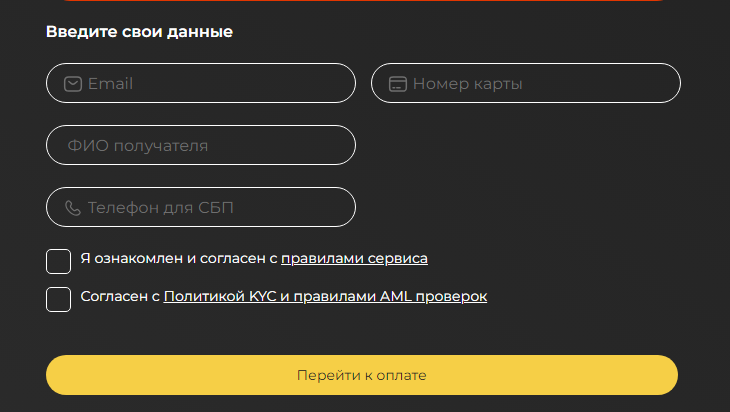
Ввод реквизитов:
– Адрес BTC-кошелька: Укажите адрес, с которого вы будете отправлять Bitcoin.
– Номер банковской карты: Введите номер вашей карты, на которую будут зачислены средства.
– Банк получателя: Укажите название банка, эмитировавшего вашу карту (например, Сбербанк, Тинькофф).
– ФИО владельца карты: Укажите ваше полное имя в соответствии с данными банка
Контактные данные:
– Email: Введите ваш адрес электронной почты для получения уведомлений.
– Телефон: Укажите номер телефона для связи в случае необходимости.
Шаг 3: Подтверждение и оплата заявки
Проверка данных: Внимательно проверьте все введенные данные на правильность.
Согласие с правилами: Ознакомьтесь с условиями обслуживания и поставьте галочку о согласии.
Создание заявки: Нажмите кнопку "Обменять" или "Создать заявку".
Оплата:
– Вам будет предоставлен адрес Bitcoin-кошелька обменника.
– Переведите указанную сумму Bitcoin на этот адрес.
– Важно: Учитывайте комиссию сети Bitcoin при отправке средств.
Шаг 4: Ожидание завершения обмена
– Подтверждение транзакции: После отправки Bitcoin ожидайте подтверждения в сети (обычно требуется от 1 до 6 подтверждений).
– Зачисление средств: После подтверждения транзакции обменник выполнит перевод средств на вашу банковскую карту.
– Уведомление: Вы получите письмо на электронную почту о успешном завершении обмена.
Преимущества использования e-change.io
– Выгодные курсы: Конкурентоспособные обменные курсы по сравнению с другими сервисами.
– Быстрые операции: Средства зачисляются на карту в кратчайшие сроки после подтверждения транзакции.
– Поддержка клиентов: Круглосуточная служба поддержки готова ответить на ваши вопросы.
– Безопасность: Высокий уровень защиты данных и транзакций.
Альтернативные способы обмена Bitcoin на карту
Криптовалютные биржи:
– Требуют регистрации и верификации.
– Процесс обмена может занять больше времени.
– Пример: Binance, EXMO.
P2P-платформы:
– Обмен напрямую с другими пользователями.
– Требует осторожности и внимательности.
– Пример: LocalBitcoins, Paxful.
Криптоматы:
– Физические устройства для обмена криптовалюты.
– Ограниченная географическая доступность.
– Высокие комиссии.
Советы по безопасности при использовании обменников
– Проверяйте URL: Убедитесь, что вы находитесь на официальном сайте обменника.
– Отзывы и рейтинги: Изучите мнения других пользователей о сервисе.
– Антивирусная защита: Обновляйте программное обеспечение и используйте надежные антивирусы
Комиссии и сроки проведения операций
– Комиссия обменника: Обычно включена в обменный курс или указана отдельно. Однако на нашем обменнике она минимальна.
– Сетевая комиссия Bitcoin: Устанавливается отправителем и влияет на скорость подтверждения транзакции.
– Банковские комиссии: Некоторые банки могут взимать дополнительную плату за входящие переводы.
Часто задаваемые вопросы
Сколько времени занимает обмен через e-change.io?
– Обычно от 15 минут до 1 часа, в зависимости от скорости подтверждения сети Bitcoin.
Есть ли ограничения по сумме обмена?
– Минимальные и максимальные суммы обмена указаны на сайте обменника и могут варьироваться.
Могу ли я отменить заявку на обмен?
– Если вы еще не совершили оплату, вы можете отменить заявку. После отправки Bitcoin отмена невозможна.
Больше вопросов и ответов вы можете увидеть на странице FAQ.
Заключение
Обмен Bitcoin на банковскую карту через криптообменник — это быстрый и удобный способ получить доступ к вашим средствам в фиатной валюте. Используя надежные сервисы, такие как e-change.io, вы можете быть уверены в безопасности и эффективности процесса. Всегда соблюдайте меры предосторожности и тщательно проверяйте введенные данные, чтобы избежать ошибок и задержек.
